One Platform for Every Revenue Decision
The decisions that shape revenue performance shouldn't happen in isolation. Varicent helps enterprise revenue teams connect planning, incentives, seller execution, and AI to design revenue systems that continuously improve and adapt as the business evolves.
Sales Planning
Incentives
Seller Insights
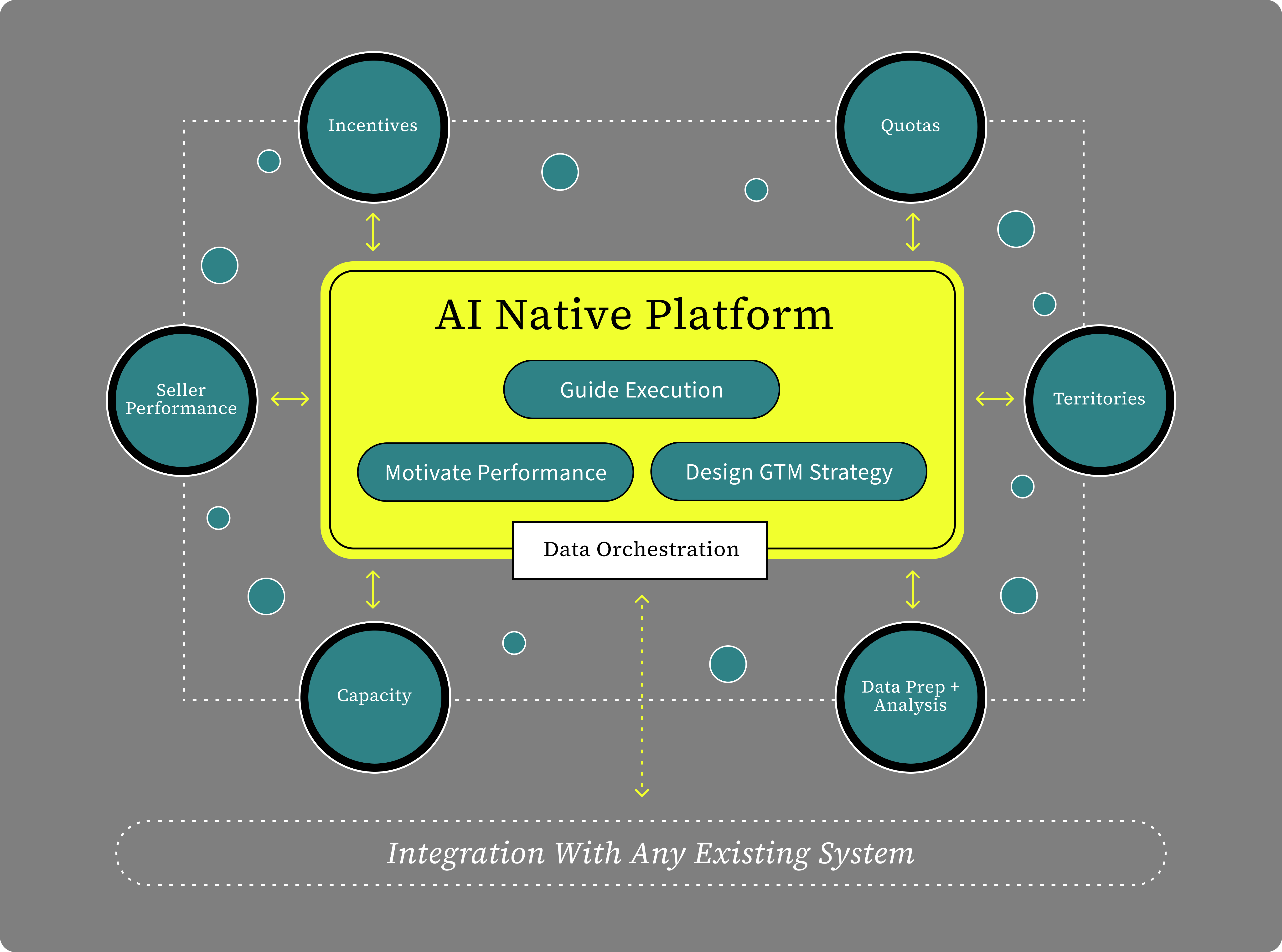
A Smarter System for Revenue Performance
Varicent brings every part of revenue performance into a shared, AI-native system. As plans move into execution, the platform connects performance back to the decisions that shape it. Each cycle gets smarter, whether your team owns incentives, planning, territories, quotas, seller performance, or the system as a whole.
Varicent named
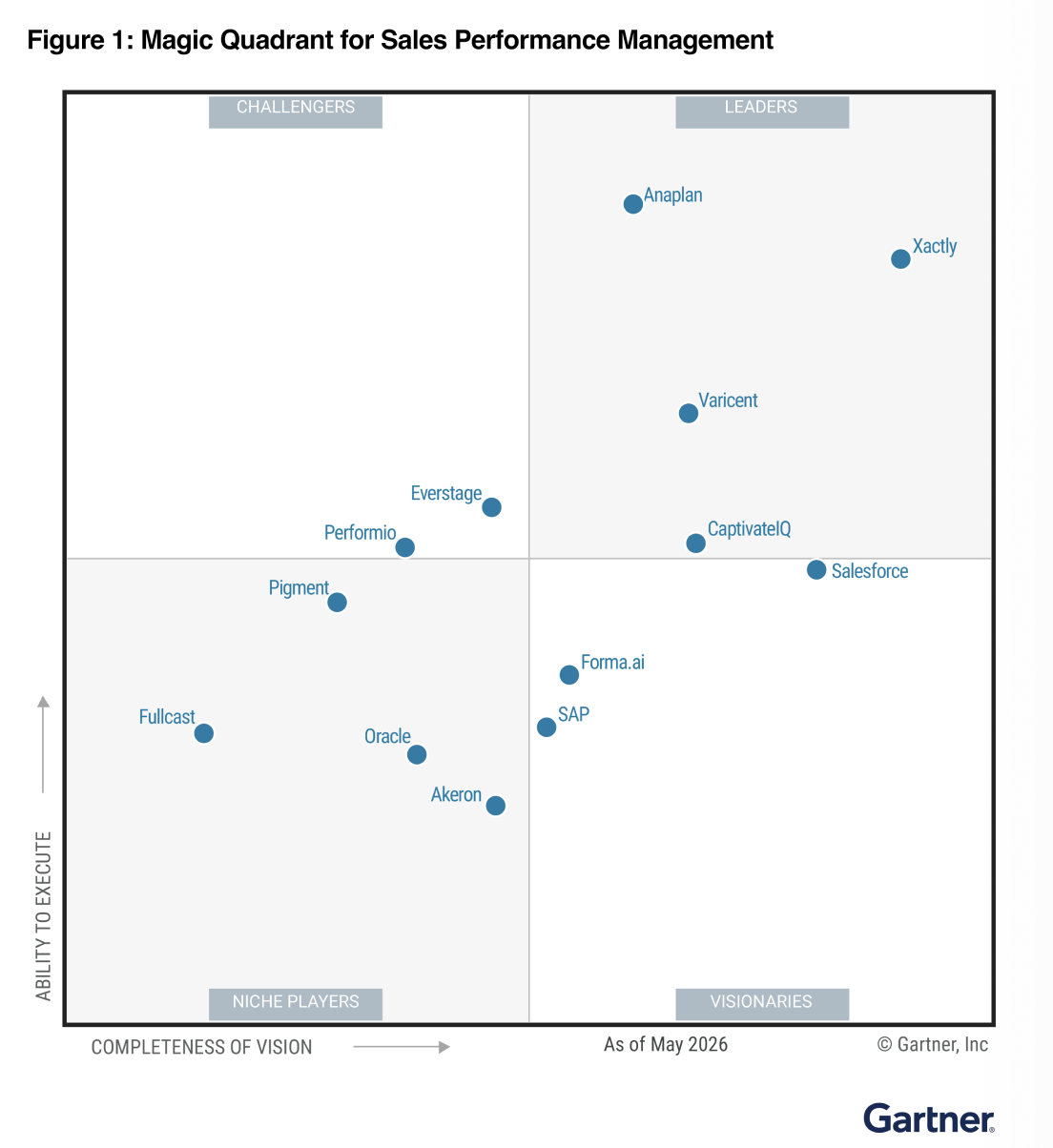
a Leader by Gartner®
2026 Gartner® Magic Quadrant™ for Sales Performance Management
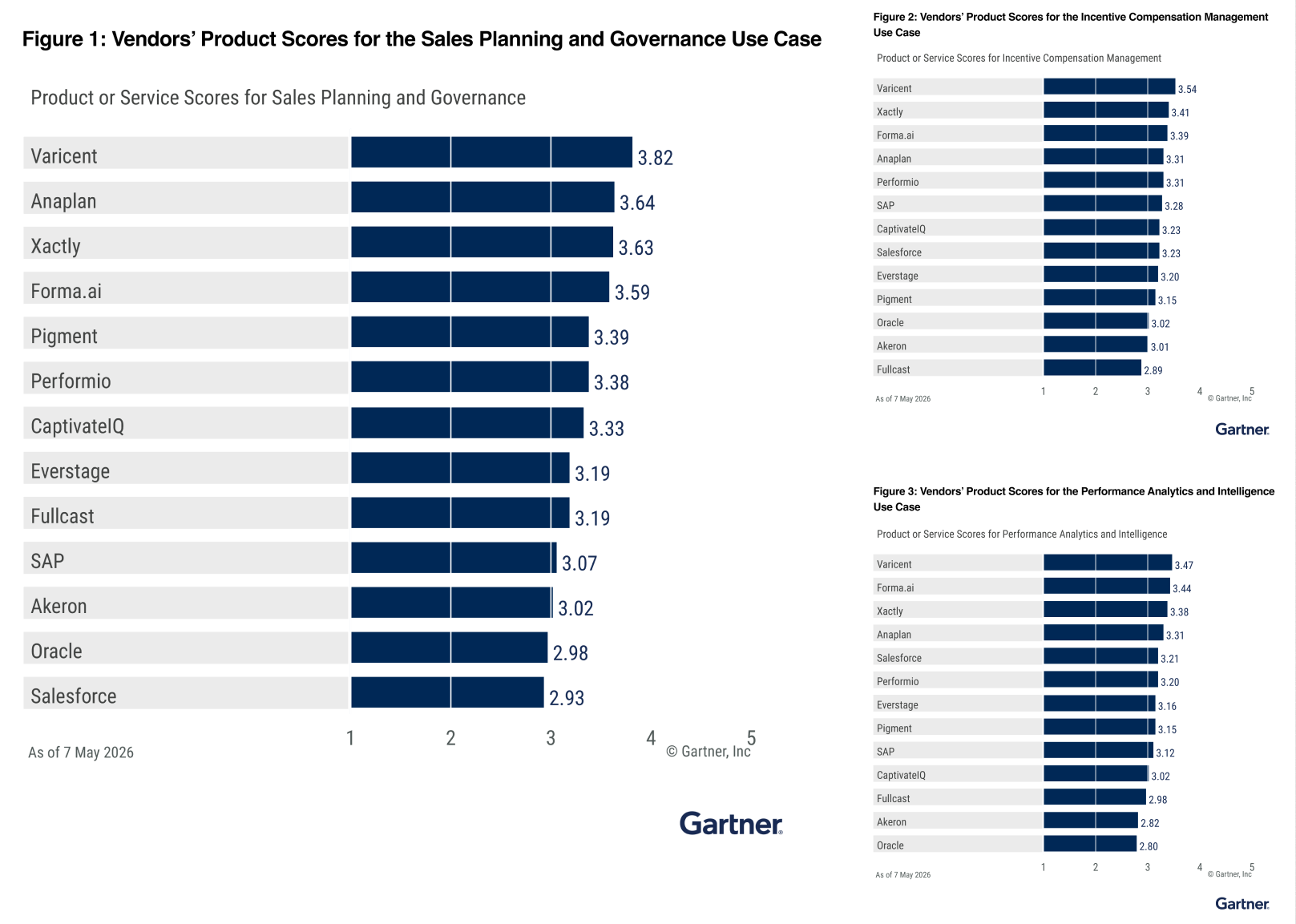
Varicent ranked 1st in all evaluated Use Cases in the 2026 Gartner® Critical Capabilities for Sales Performance Management
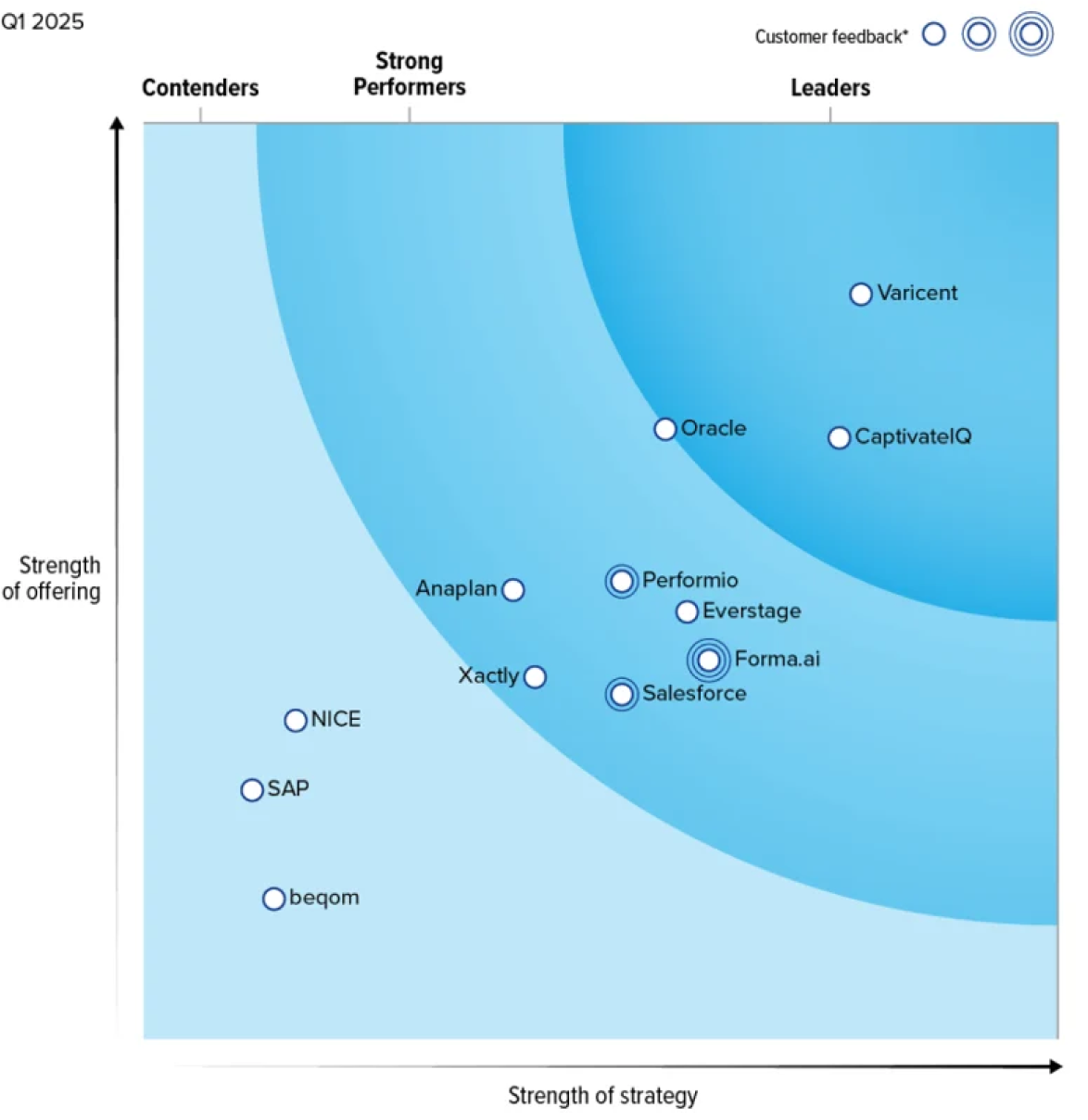
Varicent named
a Leader by Forrester
The Forrester Wave™: Sales Performance Management Solutions for Incentive Compensation, Q1 2025.
The Metrics That Matter
Trusted by Leaders Around the World

See What a Connected, AI-Native SPM Platform Can Do For You
Explore how enterprise revenue teams use Varicent to connect planning, incentives, seller experience, and revenue data so they can respond faster to change, make better decisions, and improve revenue performance.
Watch The Product Tour
Enter your information to begin the product tour.
00:00:00 - 00:00:26
In today's session, we're going to walk through how Verrison unlocks end to-end sales performance management. We're going to take four stops along the way. We'll start with sales planning. This is where your strategy is defined. How are you going to go after the market opportunity? Then we'll move into how we bring that planning data and marry it with other source data from around your company to drive accurate crediting for your compensation plans.
00:00:24 - 00:00:51
After that, we'll move into incentives and show you how we're unlocking agility and the ability to more rapidly create and manage compensation logic. And finally, we'll look at seller insights, where all this comes together in the field for your sellers so they can interact with the system in new ways. Sales planning is really all about scenarios.
00:00:46 - 00:01:11
It's about being able to identify risks and opportunities, avoiding the risks and capitalizing on the opportunities. Traditionally, this is done in fragmented, disconnected spreadsheets all over the organization. And usually by the time the plan is compiled, the market has moved. You're behind and you certainly don't have time to plan alternate scenarios.
00:01:09 - 00:01:36
Well, we're going to see how Veracent gives you a new way of thinking about your go-to market plan and how you can enable scenarios and plan against scenarios all along the way with built-in assistance to accelerate your decisionmaking. This is sales planning in VericScent. A visually engaging way of looking at your organization, not tables, not spreadsheets.
00:01:32 - 00:02:01
I can see top to bottom how my organization is constructed and what my targets are. Everything you see on this screen is managed in a scenario context. So if I want to create an alternate approach to territory design or quotas, I can do that with just a couple of clicks. It's not just about creating the scenarios.
00:01:56 - 00:02:35
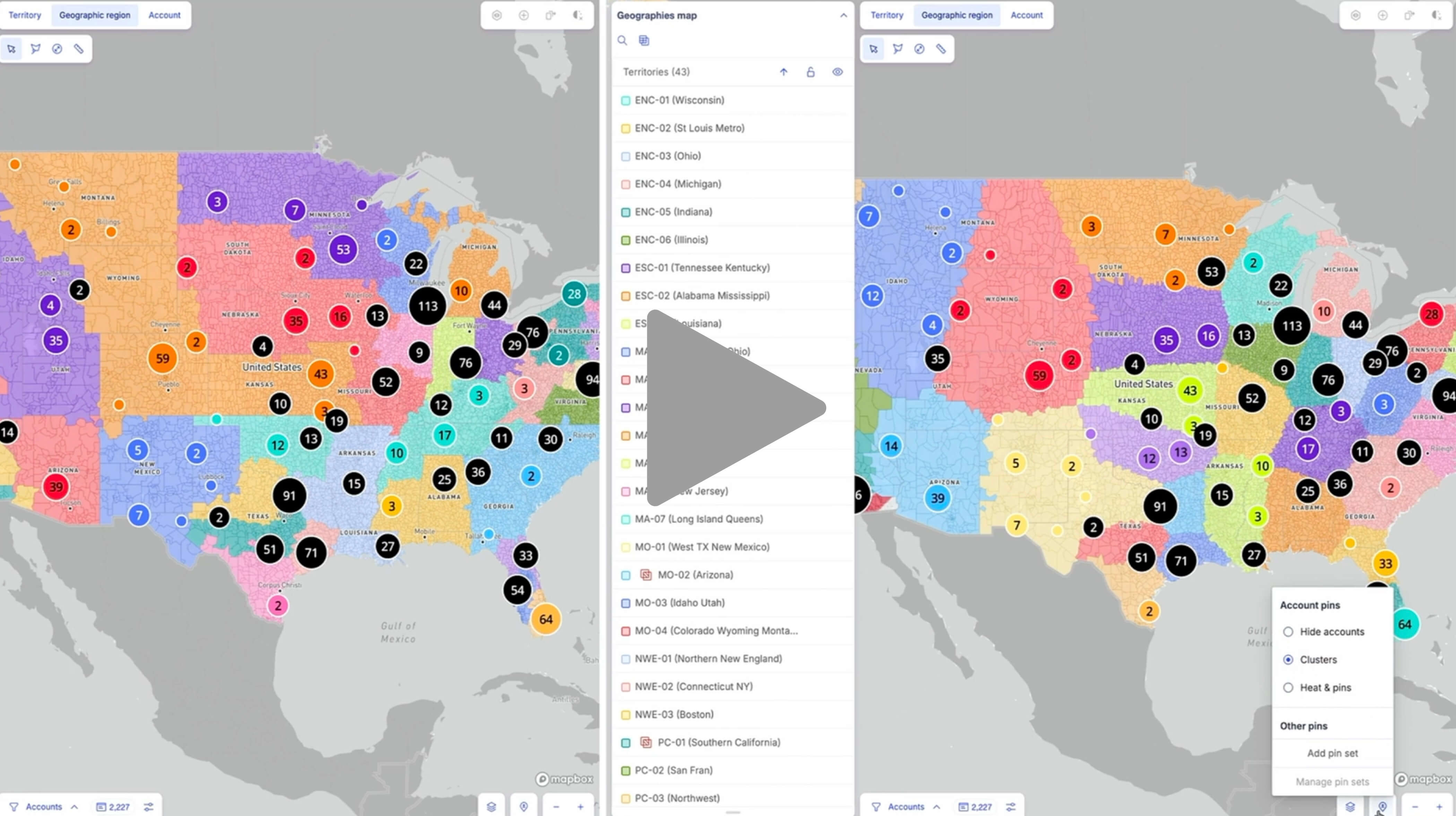
It's about the power to compare those scenarios. Varicent sales planning allows you to compare any scenarios side by side to visualize the impact of your changes. We're going to see here how North America enterprise territories compare between scenario one and scenario 2. We can see this visually on a map side by side. But to get even more granular, additional elements can also be layered onto this map.
00:02:30 - 00:02:53
For example, I can add account clusters and size. This allows me to see the actual density of business within these boundaries, ensuring that every territory is balanced and carries enough weight to meet our goals. I could add seller locations to ensure localized coverage so we're not flying sellers across the country to cover accounts.
00:02:51 - 00:03:19
Once I build my scenarios and make the corrections I want, the system allows me to activate the desired plan instantly. With this level of visibility, I'm moving very quickly from planning to executing with confidence. Now, the question is, how can you make this process streamlined when numerous conditions and scenarios need to be evaluated before finalizing a plan? This is where intelligence comes in.
00:03:17 - 00:03:49
I can navigate to my sales planning assistant to get help with analysis and decision-making. Here I'm asking, can you compare quota for new business across scenario one and scenario two for my North America Enterprise Direct team? Instead of me digging through spreadsheets to find the delta, AI is now summarizing the difference, giving me all the information in a clear sidebyside table.
00:03:51 - 00:04:24
Now, let's take it a step further. I'll ask it to summarize the disruption or differences between the two scenarios we have here. This is the so what of the plan understanding the friction that changes might cause for the sales force sales planning assistant is not only giving me the highle summary but also a detailed list of accounts that have moved from one territory to another between these scenarios.
00:04:20 - 00:04:44
I can see the account names, the previous territories, and specific sellers impacted by these changes. I can continue this analysis as much as I want until I'm comfortable. But I no longer need to export the data to Excel or any other system to perform this analysis. It all happens right here in real time.
00:04:39 - 00:04:55
This isn't AI replacing the planner. It's AI making the planner significantly faster. Decisions that used to take days of manual analysis now take minutes. That's intelligence working the way it should.
00:00:00 - 00:00:24
Now that we finalized our plan and optimized our territories using AI, the focus shifts to execution. A plan is only as good as your ability to act on it. Specifically, ensuring that when a deal closes, the right person is credited the right amount at the right time. But as anyone in operations knows, planning results alone aren't enough to run commissions.
00:00:20 - 00:00:47
To get crediting right, you have to marry your new territory definitions with a constant stream of live data from your CRM, your HRIS, your finance systems. Instead of waiting weeks for a data engineer to do this work, we enable business users to define complex logic in plain English. Data preparation becomes fast, transparent, and most importantly, testable.
00:00:45 - 00:01:13
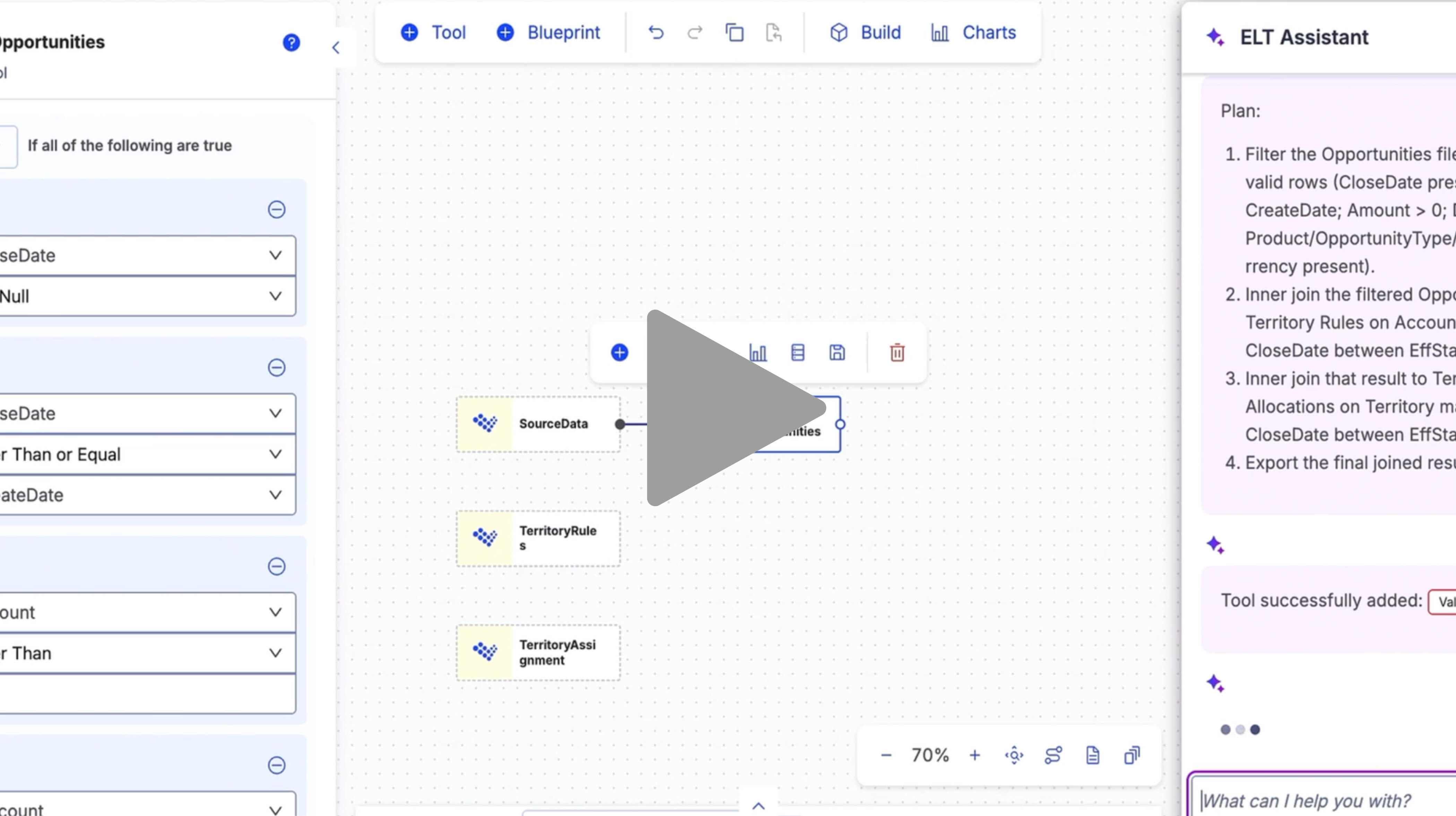
Let's take a look at how connected data and intelligence come together to turn these planning results and additional data points into automated accurate credits. Within ELT, we start with connecting the data. Whether it's coming from planning, workday, Salesforce, or anywhere in your organization, ELT provides connectivity to ensure you have a streamlined way to consolidate all those data points.
00:01:08 - 00:01:52
Once the data is connected, I need to configure the data pipeline. I could use our toolkit to build a data pipe or I can use built-in intelligence with ELT assistant. I simply explain what I want and the assistant goes to work building the logic for me. So first it will validate the opportunity data make sure the records are complete that they have all the required fields that we can actually use this data to compare against our territories and then it's going to use the core ELT toolkit to build my data pipe.
00:01:50 - 00:02:27
ELT includes tools for data joins filters and various combinations of data cleansing and validation. and ELT Assistant knows all of these tools. The end result is we're going to have an export of credited opportunities available for use in our incentive plans. I can review everything the assistant built, make any changes, and even run automated unit tests to validate the results.
00:02:24 - 00:02:53
And of course, I can have ELT Assistant create the documentation for me. In just a few short minutes, ELT has created, validated, and documented my data feed. This is connected and intelligent working together.
00:00:00 - 00:00:22
Now, let's move into incentives. This is where everything comes together and often where the process becomes most complex. Building dynamic compensation plans that take credited sales data and determine exactly who gets paid, how much, and why. For many organizations, this is where the process starts to break down.
00:00:20 - 00:00:48
Requirements originate in meetings with executives, get documented in PDFs, passed around through email or Slack, and eventually someone has to translate those requirements into compensation logic. Along the way, requirements are missed, details are misunderstood, and valuable context gets lost. What I want to show you is how we're eliminating those disconnects by managing the entire process directly within Varicent.
00:00:45 - 00:01:11
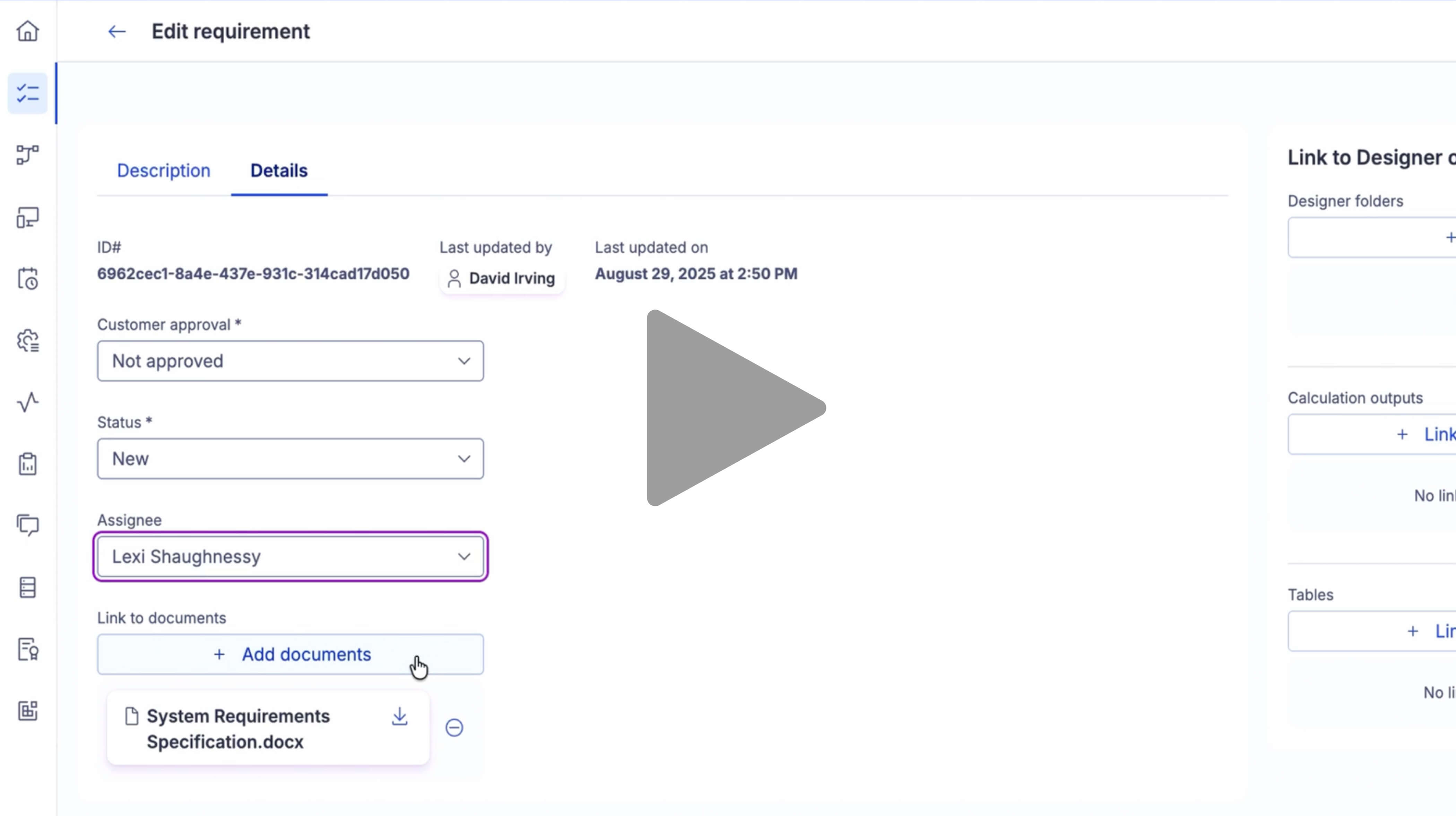
It starts with requirements management. Rather than searching through folders of PDFs and documentation, we can capture and manage requirements directly in the platform. These requirements become actionable tasks that can be tracked, assigned, and collaborated on throughout the implementation process. I can review the business requirements that were submitted and document exactly how the process is expected to work.
00:01:09 - 00:01:37
Once the requirements are defined, I can assign them to a member of my team to build the functionality within the compensation plan or application. As work progresses, my team can update the task, indicate when it's complete, and link directly to supporting assets within the system. That might include the tables used to support the process, related documentation, or the calculations and rules that were implemented.
00:01:35 - 00:02:01
The result is a much more efficient and collaborative approach. Instead of managing requirements offline across multiple tools, everything stays connected within the platform, creating a clear line of sight from business requirement to system implementation. Now, let's move into the core of the system, designer.
00:01:59 - 00:02:22
Designer provides a modern visual way to build and manage compensation plans and calculation logic. The platform is highly flexible. I can organize designer around comp plans, reusable components, or whatever structure makes the most sense for my organization. In this example, I'm navigating through different components to reach a specific plan.
00:02:20 - 00:02:45
When it comes to building calculation logic, designer gives me an endless canvas allowing me to construct whatever logic I need to support my business. Let's look at an example. Imagine the CRO decides to run a quarterly spiff on certain sales excluding a specific product line. The spiff pays out a thousand to five thousand dollars depending on the amount of qualifying revenue.
00:02:43 - 00:03:11
Traditionally, I would need to manually design and build that logic in the system. But with designer assistant, I simply copied the requirements from an email and pasted them into the system. Designer assistant understands that it needs to identify the relevant credits, aggregate qualifying sales, evaluate attainment against bonus tiers, and then calculate the appropriate payout.
00:03:12 - 00:03:48
This is like having a dedicated Varicent model builder sitting by my side. An intelligent assistant that understands my data, understands Varicent, and helps me accelerate the design process. As the logic is created, I can review the outputs and validate the actual results being generated. I can see exactly what was built and verify that it's producing the expected outcomes.
00:04:03 - 00:04:28
The assistant can also generate automated testing scenarios. Rather than manually creating unit tests, it can build sample test cases, define expected results, execute the calculations, and compare actual outcomes against those expectations. This dramatically reduces the effort required to validate new compensation logic before it goes into production.
00:04:26 - 00:04:49
Once the logic is finalized, the next challenge is explaining it to the sellers. Designer assistant can help with that as well. I can simply ask it to explain the calculation from a seller's perspective. In seconds, it generates clear, business-friendly language that I can use in an email, a sales portal, training materials, or compensation documentation.
00:04:48 - 00:04:57
Sellers gain a better understanding of how they're being paid, and they can spend less time interpreting compensation plans, and more time selling.
00:00:00 - 00:00:24
Finally, let's talk about the person we're ultimately trying to support through all of this, the seller. Every capability we've discussed, from territory planning to data integration to incentive management, exists for one reason, to drive revenue growth. But at the end of that process sits the seller receiving the outputs of those systems and trying to answer a simple question.
00:00:21 - 00:00:44
Is this right? Did I get paid correctly? Was this deal credited properly? How was this calculation determined? Organizations don't pay sellers to audit their own compensation plans. They pay sellers to sell. Our goal is to help sellers get answers quickly, understand what they're being paid and why, and then get back to generating revenue.
00:00:42 - 00:01:07
That's how you drive productivity and growth across the organization. When we talk to customers, we found that seller questions generally fall into two categories. The first category represents roughly 40% of the questions coming from the field. These are questions that are often already answerable with information the company has provided.
00:01:01 - 00:01:30
The answers exist in compensation plans, FAQs, policy docs, terms and conditions. The challenge isn't that the information doesn't exist. The challenge is that sellers don't want to spend time searching through pages of documentation to find a simple answer. Instead, they raise their hand and ask someone for help. That creates delays for the seller and additional work for compensation administrators, sales operations teams, and sales managers.
00:01:26 - 00:01:51
If we could eliminate a significant portion of those routine questions and provide instant answers, that would be a major productivity win for everyone involved. The remaining questions are often more complex. These are the datadriven questions, the math questions, the questions that require an understanding of credits, calculations, logic, and payouts.
00:01:47 - 00:02:09
They're harder to answer quickly because they require context and analysis. As we walk through the seller experience, you'll see how Veracent helps address both categories. Starting with those common everyday questions that consume so much time across the organization. Let's look at this from the seller's perspective.
00:02:05 - 00:02:28
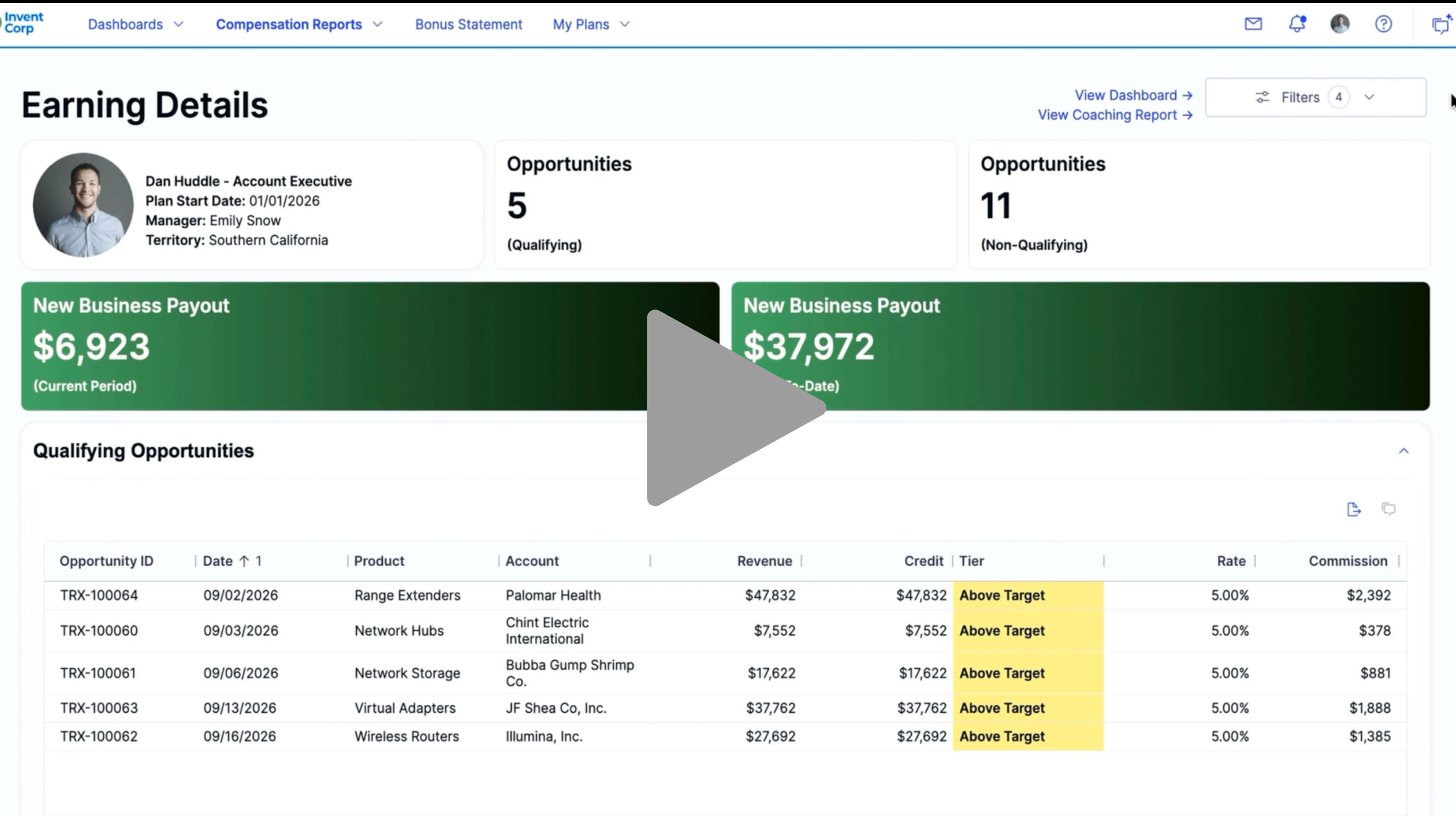
I'm Dan Huddle, a seller reviewing my dashboard, and I have a simple question. What's the difference between credit and revenue? I could search through FAQs and compensation documents, but realistically, most sellers aren't going to do that. They're going to ask someone for the answer. Instead, I can simply ask my assistant within seconds.
00:02:25 - 00:02:48
It provides an explanation sourced directly from company approved FAQs and documentation, complete with links to supporting materials if I want to learn more. If that answers my question, I'm done and back to selling. This is exactly the type of interaction that helps reduce the volume of routine questions coming into compensation and sales operations teams.
00:02:46 - 00:03:08
Now let's look at a more complex question. Suppose I ask why was I credited the way I was on this deal. That's not a question we want AI guessing at. There may be compensation rules, crediting logic, territory assignments, and transaction details involved. The risk of providing an incorrect answer is simply too high.
00:03:03 - 00:03:36
In those situations, the assistant takes a different approach. Rather than attempting to generate an answer, it recommends that the seller submit a formal inquiry to the compensation team. Behind the scenes, all of those responses are managed within Veracent. Administrators can easily configure the knowledge base that drives the inquiry assistant by loading FAQs, policy documents, compensation plans, and supporting resources that already exist within the organization.
00:03:34 - 00:04:00
The platform can even provide role specific guidance. For example, account executives, customer success managers, and other seller populations may each have their own compensation plans and supporting documentation. Because the assistant understands who is asking the question, it can provide highly relevant contextaware responses based only on the documentation that applies to that individual.
00:03:55 - 00:04:20
Just as importantly, it's secure. The assistant is not searching the internet or accessing unrelated company data. It's operating exclusively within approved documentation and approved data sources, ensuring sellers receive trusted, controlled responses while maintaining appropriate security and governance. This intentional design is critical.
00:04:15 - 00:04:52
We want the assistant to be helpful, but we don't want it inventing answers. A confident but incorrect response creates a much larger problem than simply routing a question to the right team. That brings us to the second category of questions. the one that require the ones that require investigation. Questions like why was it I paid more on this deal? That brings us to the second category of questions, the ones that require investigation.
00:04:47 - 00:05:12
Questions like, why wasn't I paid more on this deal? Why was my payout lower than expected? Why did this transaction receive this credit assignment? These questions often require deep analysis of compensation logic, crediting rules, and plan calculations. That's where research assistant comes in. From the seller's perspective, they're simply submitting an inquiry.
00:05:07 - 00:05:40
They can provide details, attach supporting documentation, and send the request to the compensation team. But on the back end, research assistant immediately begins working alongside the administrator. It understands your compensation structures, data models, and calculation logic. Instead of starting from scratch, it performs the initial investigation automatically and produces a detailed analysis explaining what happened and why.
00:05:35 - 00:06:00
In many cases, that analysis surfaces the answer immediately. In others, it may identify potential issues or anomalies that require additional context. For example, an administrator might know there was a failed data feed or an upstream system issue. that information can be added to the investigation and the assistant can continue its research with the new context.
00:05:55 - 00:06:25
The difference is that work which traditionally takes hours or sometimes days can begin immediately and continue automatically in the background. Once the investigation is complete, the administrator receives a detailed explanation of the findings. That explanation is often technical and intended for internal use, but research assistant can then transform those findings into a seller friendly response that clearly explains the outcome in business language.
00:06:21 - 00:06:46
The administrator remains in control with the ability to review, edit, and add any additional commentary before sending the response back to the seller. The result is a dramatically faster inquiry process. Sellers receive answers more quickly. Compensation teams spend less time performing manual research and organizations can scale support without adding headcount.
00:06:41 - 00:07:20
Early customer results have been extremely encouraging. Organizations are reporting reductions of 40 to 90% in the time required to research and resolve compensation inquiries. As we wrap up, this really brings together everything we've discussed today. From planning and territory design to data integration, compensation administration, seller communications, and inquiry resolution, Verrison is focused on improving productivity across the entire sales performance management process.
00:07:14 - 00:07:37
The goal isn't simply to add AI to existing workflows. The goal is to help organizations work differently, reducing manual effort, accelerating decision-making, and allowing every participant in the process from administrators to sellers to focus on higher value work. That's how we unlock end toend value across sales performance management.